Capturing the excitement of sports on video is an attractive challenge for many people. However, beginners often find themselves wondering which camera to choose and how to film. The action camera, as its name suggests, is the ideal tool for capturing fast-moving scenes. Below, we introduce step-by-step techniques for beginners to shoot spectacular action videos.
Basics of Choosing a Camera
Let’s start with how to choose an action camera. Resolution and frame rate are directly linked to the smoothness of the video. While 1080p is sufficient, choosing 60fps or higher will help reduce blur even in fast-paced sports. Waterproof performance is also important, enabling filming in or around water, such as swimming or surfing. Furthermore, compact and lightweight models won’t be a burden when mounted on your body.
If you anticipate long filming sessions, check the battery life. Recently, models like the Insta360 are increasing in popularity, offering high performance, light weight, and excellent waterproofing, making them easy choices for beginners. When selecting, prioritize features like image stabilization and wide-angle lenses to capture more dynamic footage.
Preparation Before Filming
Before starting to film, it is essential to prepare the environment and your gear.
- First, check the camera settings: confirm the resolution, frame rate, presence of a waterproof case, and battery level.
- Next, do not forget to check the safety of the shooting location. Especially in sports, you need to understand the range of movement and surrounding obstacles.
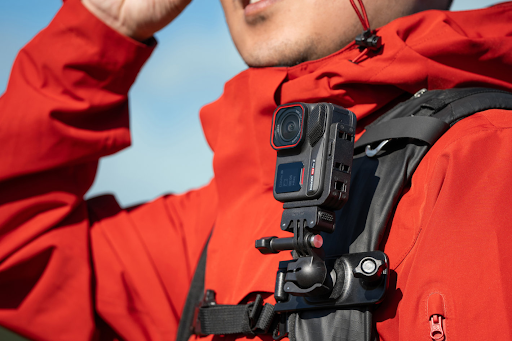
- Beginners should also pay attention to how the camera is mounted. Using a helmet or chest mount provides steadier footage than handheld shooting.
- Additionally, fine-tuning the angle and position can record more immersive footage. Small preparations can significantly impact the quality of your video.
Basic Filming Techniques
To capture dynamic footage with an アクションカメラ, there are several basic techniques.
- Varying the perspective is key. Focusing on low or diagonal angles increases the sense of speed and dynamism.
- When moving the camera, the key is to avoid abrupt swings or rotations and move it smoothly.
- In fast-moving sports, be conscious of the subject’s path within the frame. When the subject crosses the center of the screen, it creates a natural sense of following.
- Cameras like Insta360 offer models that allow for later angle correction and tracking editing, making it relatively easy for beginners to create professional-looking videos.
Utilizing Light and Environment
Lighting conditions significantly influence the look of your video.
- In bright, daytime conditions, you can reduce noise by setting a low ISO. Conversely, on overcast days or in dark locations, be cautious of image quality becoming grainy if the ISO is set too high.
- Filming while being conscious of the angle of natural light emphasizes a sense of depth and speed.
- The choice of weather and background is also crucial. Utilizing reflections on water or snow, or the expanse of a landscape, adds dynamism to the video. By being aware of the environment, you can create impressive footage without relying solely on the camera’s performance.
See also: The Role of Clear Communication in Technical Documentation
Anti-Shake Measures and Stability
In dynamic sports footage, suppressing shake and blur is essential. Since action cameras are lightweight, vibrations tend to appear easily in handheld footage. You can get less shaky video by using a gimbal, chest mount, or tripod.
Insta360 cameras come equipped with image stabilization features, allowing you to record stable footage even in highly dynamic scenes. However, stabilization is not perfect, so be conscious of your own movements as the camera operator. Simply walking smoothly or minimizing body rotation will make the footage significantly easier to watch.
Editing and Finishing
Post-production editing is a crucial step in bringing out the dynamism of your video.
- First, cut out unnecessary scenes to create a well-paced composition.
- Adding slow motion and zoom appropriately can create a dynamic effect.
- Don’t forget color correction. Adjusting brightness and contrast improves the overall look of the video.
There are many easy-to-use editing software options for beginners, and Insta360 allows for simple editing with its dedicated app. Since you can correct the filming angle later or add subject tracking, it becomes easier to create a professional-looking final product.
Tips for Social Media and Sharing
Sharing your exciting footage on social media or video platforms doubles the fun. To create a video that resonates with viewers, optimization for vertical or horizontal format and resolution is necessary. Creating short clips optimized for social media is more likely to capture viewer interest.
- Using creative hashtags and captions makes it easier for more people to see your content. Including keywords like the name of the sport or “action camera filming” will help it reach users with similar hobbies.
- Social media can be used not just for sharing, but also as a place to receive feedback and make improvements.
Summary of Action Camera Use and Next Steps
Even as a beginner, you can capture dynamic sports footage using an action camera. The key is to follow the steps in order: camera selection, preparation, filming techniques, utilizing light, anti-shake measures, editing, and sharing. As you gain experience, you can create more dynamic and appealing videos. The latest cameras like Insta360 are easy for beginners to handle and expand the range of visual expression. Start with small challenges and gradually move on to more complex sports and angles. With practice and ingenuity, your sports videos will surely evolve.